











Keep your ticket number or code after placing a bet. It gives you a practical way to review the selections, stake, current status, and final result from a phone or computer.

What Is a Throne Bet Ticket
When you place a wager, Throne Bet generates an electronic ticket that acts as a receipt and record of the bet. It normally brings together the selected events, odds at placement, stake, and current status. A ticket can remain pending while an event is still awaiting settlement, then show a final result when the relevant markets are settled.
The ticket number is the main reference assigned to the bet. A ticket code may also be shown as a shorter reference, depending on how the ticket was created. Save the confirmation screen or write down the available reference before closing the page. This is especially useful when checking from another device or when you are not currently signed in.
Ways to Check Your Ticket
You can check a ticket through the website, an account history view, or a supported mobile app. A manual lookup normally requires the ticket number or code. If you are signed in, your account history may be more convenient because it groups previous tickets and shows their individual selections.

The mobile app can be useful when a scan option is available for a printed slip or displayed code. The best method is the one that matches the information you have: use the account history for your own bets, and use a manual number or code lookup when you only have the ticket reference.
How to Check a Ticket by Number
Open the official Throne Bet website and locate the ticket check field. Enter the complete ticket number exactly as it appears on the confirmation screen or ticket record, then submit it. Avoid adding spaces, dropping leading digits, or confusing similar characters when copying from a photograph.
A successful lookup should show the ticket details and the current state of its selections. A settled ticket can display the final outcome and applicable return, while an open ticket may remain pending. If no record appears, compare the number character by character and try again before contacting support.
How to Check a Ticket by Code
Enter the ticket code in the same checking area when that is the reference shown on your slip or confirmation. Type letters and numbers exactly as displayed; some systems distinguish between uppercase and lowercase characters. Do not add punctuation or spaces unless they are visibly part of the code.
An invalid result can mean that the code was copied incorrectly, the wager was not fully confirmed, or the service has not finished processing the ticket. Keep the original confirmation available so support can check the details if the code continues to fail.
Using the Scan Ticket Feature
Scan Ticket uses the phone camera to read a barcode or QR code on a printed slip or compatible screen. After the code is recognised, the app sends the reference for verification and displays the available ticket information. This avoids manual typing, but it does not remove the need for an internet connection when the result is retrieved.
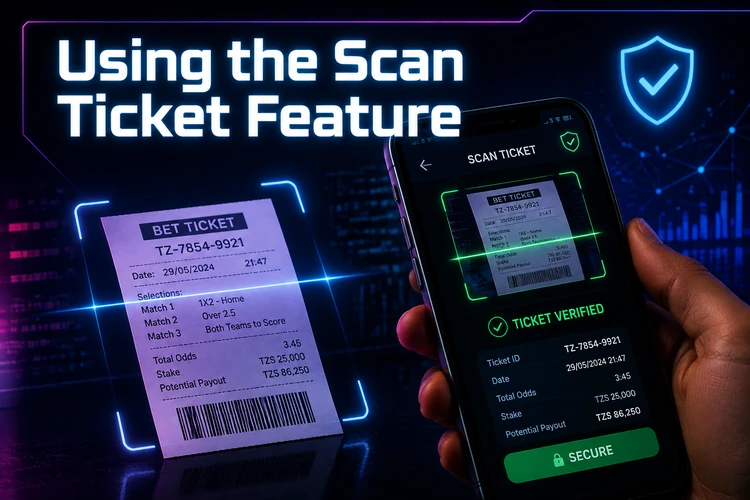
For a reliable scan, flatten the paper, use good lighting, and keep the whole code inside the camera frame. Glare, a folded slip, or a blurred screenshot can prevent recognition. If two attempts fail, use the printed number or code manually rather than repeatedly scanning the same poor image.
Checking Tickets Through the Mobile App
Android users can use the app available through the official site if the current version supports ticket checking. Follow the installation instructions shown on the download page and review the requested permissions before continuing. iPhone users can check whether the mobile website provides the required feature in their browser when no separate iOS application is available.
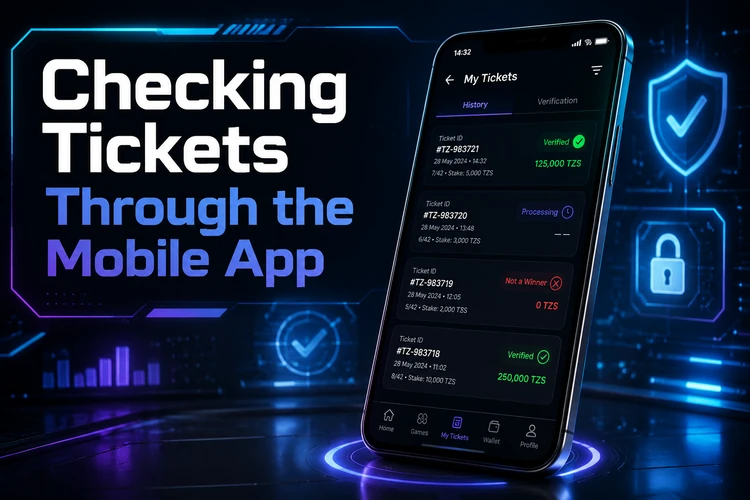
After opening the app, sign in if you want to review tickets saved in your account, or use the available standalone checking tool. Use the official source for any installation file, keep the operating system updated, and avoid APK files shared through unknown websites or messages.
Online Ticket Check Without an App
No separate installation is needed when the website provides the ticket check form. Open it in a browser on an Android phone, iPhone, tablet, or computer, enter the ticket reference, and submit the request. The lookup itself is handled online, so a stable data connection is needed and normal mobile data charges may apply.
A signed-in account can provide access to your own betting history, while a standalone lookup may show only the information linked to the reference. If the page does not load, refresh it once, check the connection, and avoid submitting the same request repeatedly.
Ticket Price and Stake Information
The ticket price is the stake selected when the bet was placed. It is separate from the combined odds and should be checked on the ticket record. For a multiple bet, the record can show the odds for each selection, the combined odds, the stake, and the possible return.
There is no need to estimate the stake from the final payout. Read the amount shown on the confirmation or ticket page, and check the applicable betting rules if you are unsure about minimums, maximums, or how a particular market is settled.
Why a Ticket Might Not Load
The usual causes are a mistyped number, an incomplete code, a ticket that has not finished processing, a temporary service problem, or a weak connection. An old page session or browser error can also interrupt a lookup. Check the reference carefully, reopen the page, and try a different browser or connection if necessary.
If the ticket still cannot be found, keep the confirmation details and contact Throne Bet support. Do not send your password or one-time security codes to another person. Support may need the ticket reference, approximate placement time, and account details to investigate.
Tips for Tanzanian Users
Mobile data performance can vary across Tanzania. On a slower connection, a direct ticket lookup may use less data than loading a complete account history. Keep a clear copy of the ticket, check the status after relevant events are settled, and use only the official website or app for verification.
Do not rely on screenshots alone if a ticket number is partly hidden or blurred. Check that the displayed currency and stake are understood before placing another wager, and remember that betting services are intended for users aged 18+ only.
FAQ
Open the ticket check area on the official website or supported mobile app. Enter the ticket number or code exactly as shown and submit the lookup. The available ticket details and current status will then be displayed.
Look at the confirmation screen or saved ticket record immediately after placing the bet. If you were signed in, the number may also be available in your account betting history.
They are references used to identify a ticket. The number is generally numeric, while the code may contain letters and numbers. Use the reference that appears on your confirmation or slip.
A standalone lookup may allow you to enter a ticket reference without signing in. An account login is normally needed to view tickets saved in your personal betting history.
It uses a compatible phone camera to read a barcode or QR code from a ticket and submit its reference for checking. Good lighting and a clear, undamaged code improve the chance of a successful scan.
Retype the code carefully, checking similar characters and any leading digits. Confirm that the bet was successfully placed, then try again later if the service may be delayed. Contact support with the original ticket details if the problem continues.